One palette, every app: inside my desktop theme engine
14 colors in, a few dozen derived tones, 36 apps recolored at once, and a shader on top
By Ty · · 14 min read · systems
Tags: #cloudwerx-os #theming #rust #linux #shaders #accessibility #color
Changing my theme is the cheapest dopamine on this machine. One keypress and the bar, the window borders, the terminal, the editor, the browser, Discord, Telegram and even the thing I talk to Claude in all flip to a new look at the same moment, with a shader reveal over the whole screen while it happens.
The question I get most when I show this to people is "how are you recoloring Discord?" The answer is a little bit evil, and I'll get to it. First, the shape of the whole thing, because I think the design is the interesting part. In how-i-built-my-own-os I promised I'd write up how the theme engine works. This is that post.
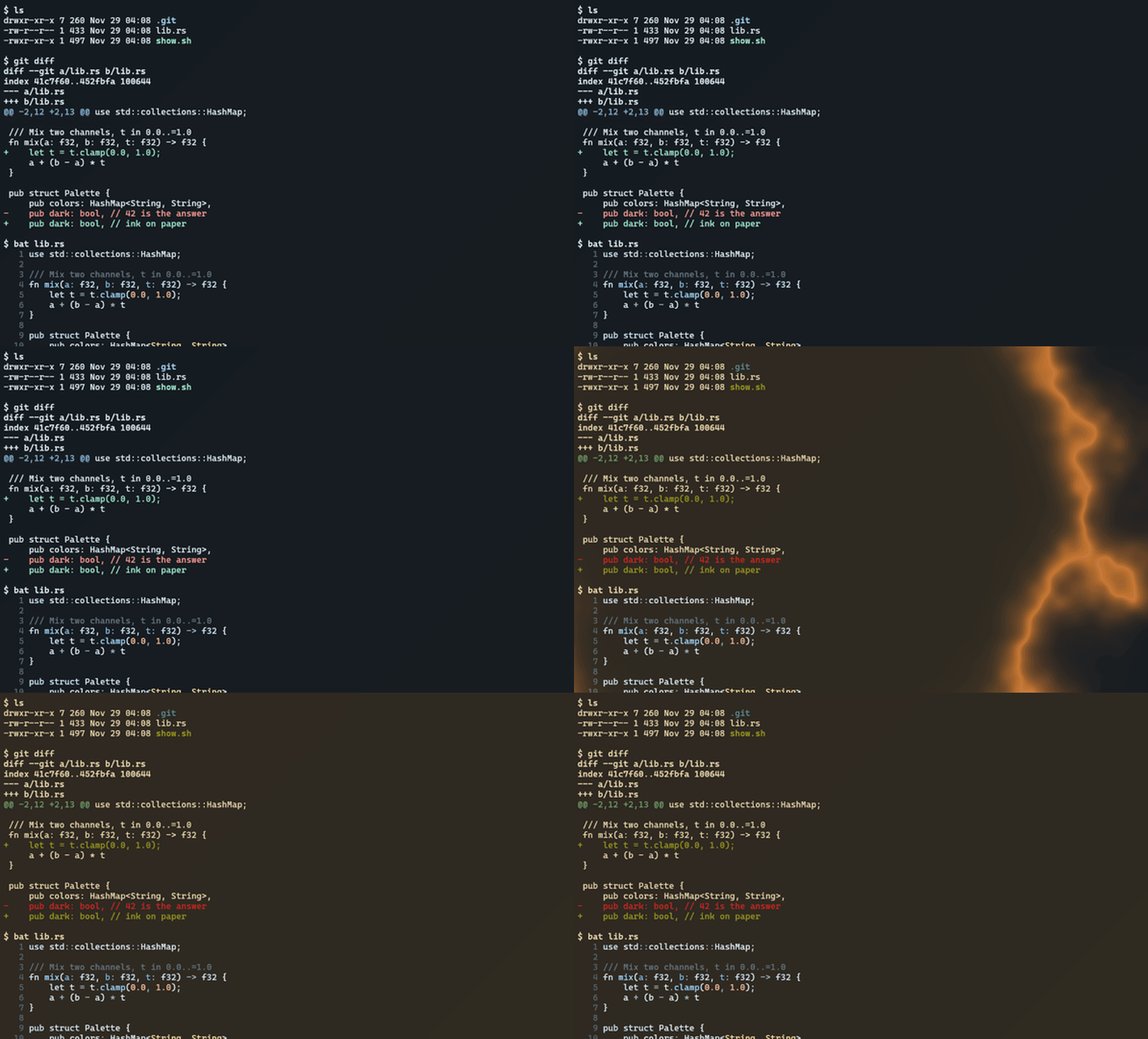
Every one of the four panels in the header image is the same kitty window running the same demo script, captured after one cloudwerx theme set <id>. The terminal colors, the git diff, the bat syntax highlighting and the ls colors all came out of one small file per theme. Nothing in that window was edited by hand.
A theme is 14 colors
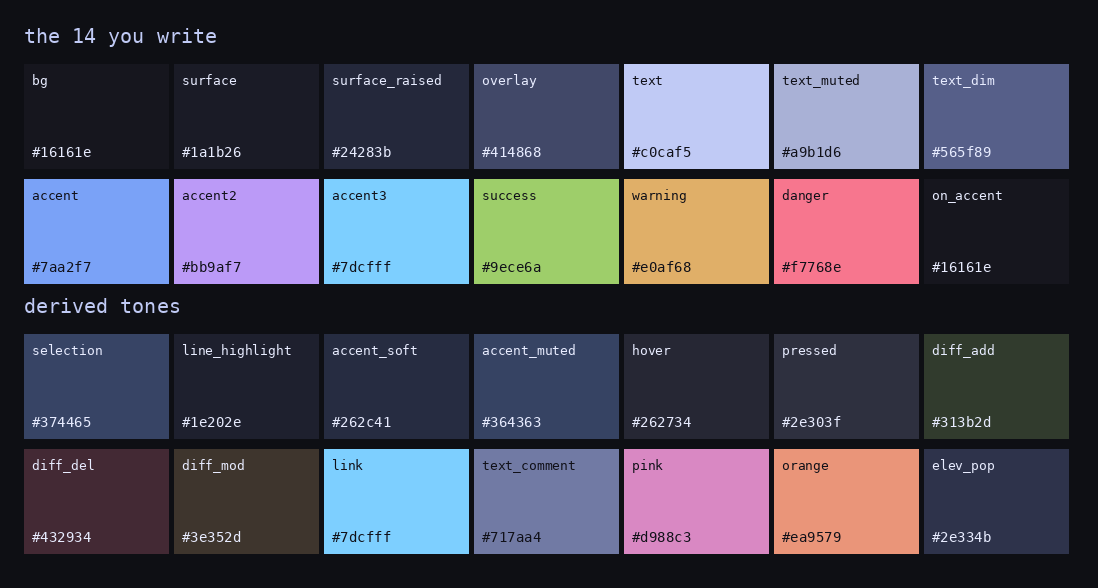
That's the whole idea. A theme in CLOUDWERX OS is a TOML file in themes/, and the only required part is 14 named colors. Here's the top of tokyo-night.toml:
name = "Tokyo Night"
family = "popular"
variant = "dark"
counterpart = "tokyo-night-day"   # what "toggle dark / light" switches to

[colors]
bg             = "#16161e"   # deepest background (lock screen, behind everything)
surface        = "#1a1b26"   # panels, bar islands, popups
surface_raised = "#24283b"   # cards / hovered rows inside panels
overlay        = "#414868"   # borders, separators, inactive dots
text           = "#c0caf5"
text_muted     = "#a9b1d6"
text_dim       = "#565f89"
accent         = "#7aa2f7"   # primary highlight
accent2        = "#bb9af7"   # secondary highlight
accent3        = "#7dcfff"   # tertiary highlight
success        = "#9ece6a"
warning        = "#e0af68"
danger         = "#f7768e"
on_accent      = "#16161e"   # text drawn on top of accent fills
Four backgrounds, three text tones, three accents, three status colors and one "ink for text on an accent fill". Everything else is derived. The optional [terminal] block with 16 ANSI colors exists too, and the popular themes use it so terminals match the original author's palette exactly, but if you leave it out the engine builds one for you.
The "popular" shelf is palettes you already know: Tokyo Night (folke's tokyonight.nvim is the best known port of it), Catppuccin, Gruvbox, Nord, Rosé Pine, Dracula, Everforest, Kanagawa and more. There are 68 shipped themes in 4 families (signature, popular, minimal and light), 14 of them light, plus one more, called dynamic, that gets generated from a wallpaper. I'll come back to that one.
The pipeline
This is the diagram from my own docs, and it's still the best way to see it:
flowchart LR
  T["themes/*.toml<br/>14 colours"] --> E["theme engine<br/>cli/src/theme.rs"]
  E --> D["derived tones<br/>selection, diff, orange, elev_*"]
  E --> J["theme.json<br/>the shell reads it"]
  D --> R["templates/*<br/>rendered per app"]
  D --> H["hooks<br/>cli/src/themeapps.rs"]
  R --> A["app config files"]
  H --> S["select the theme inside the app<br/>keep the user's other settings"]
  E --> G["gsettings<br/>dark / light, GTK, icons"]
The engine is part of the cloudwerx Rust binary. It loads the TOML and checks that all 14 colors are there and valid #rrggbb. Then it builds the full palette, which is the 14 plus 16 ANSI colors plus a few dozen derived tones. That palette goes in three directions:
- Into
theme.json, which the Quickshell bar and panels watch and recolor from. - Through a template for every app that reads a config file.
- Through a hook for every app that needs to be told "use this theme now".
There are 37 targets in templates/manifest.toml, and 36 of them apply on this machine (Kate is the one that shows n/a here). Each target says which template to render, where the output goes, how the app picks it up, and an optional when so apps you don't have are skipped.
ok   niri               Desktop      live         niri compositor
ok   gtk4               Desktop      live         GTK 4 / libadwaita apps
ok   gtk3               Desktop      live         CLOUDWERX GTK theme
ok   qt6ct              Desktop      live         Qt apps
ok   kde-colors         Desktop      relaunch     KDE colour scheme
ok   swaylock           Desktop      next-launch  swaylock
ok   herdr              Desktop      live         Herdr
ok   kitty              Terminal     live         kitty
ok   fish               Terminal     live         fish shell
ok   fzf                Terminal     next-launch  fzf
ok   starship           Terminal     live         Starship prompt
ok   zellij             Terminal     live         Zellij
ok   btop               Terminal     relaunch     btop
ok   yazi               Terminal     relaunch     Yazi file manager
ok   bat                Terminal     next-launch  bat
ok   micro              Terminal     relaunch     micro editor
ok   nvim               Terminal     live         Neovim
ok   vim                Terminal     live         Vim
ok   vscode             Editors      live         VS Code
ok   antigravity        Editors      live         Antigravity IDE
ok   zed                Editors      live         Zed
n/a  kate               Editors      relaunch     Kate
ok   geany              Editors      relaunch     Geany
ok   noteism            Editors      live         Noteism
ok   typora             Editors      relaunch     Typora
ok   obsidian           Editors      live         Obsidian
ok   chromium           Browsers     live         Chrome and Chromium
ok   firefox            Browsers     relaunch     Firefox
ok   zen                Browsers     relaunch     Zen Browser
ok   discord            Apps         live         Discord
ok   telegram           Apps         live         Telegram
ok   ghosthand          Apps         live         Ghosthand
ok   qbittorrent        Apps         relaunch     qBittorrent
ok   smplayer           Apps         next-launch  SMPlayer
ok   claude-code        AI tools     live         Claude Code
ok   prismantis         AI tools     live         Prismantis (Claude Code replies)
ok   codex              AI tools     relaunch     Codex CLI
The third column is how a running app picks the change up. live means it recolors while open, relaunch means it needs a restart, and next-launch means the next time you start it.
One more rule I'm stubborn about: one app failing never stops the others. If Zed's config is locked or some app updated its format and my hook chokes on it, the other 35 still apply, and cloudwerx theme targets tells you which one fell over and why.
Templates are dumb on purpose
A template is just the app's own config format with {{placeholders}} in it. The renderer is one short Rust function. It finds {{, reads the key, optionally splits on a . for a filter, and swaps in the value. Unknown keys are left as they are, so a typo is visible instead of silently blank.
This is the real output of cloudwerx theme render kitty.conf --theme tokyo-night, with the middle trimmed:
# Generated by CLOUDWERX OS, theme: Tokyo Night
foreground              #c0caf5
background              #16161e
selection_background    #374465
cursor                  #7aa2f7
url_color               #7dcfff
active_tab_foreground   #16161e
active_tab_background   #7aa2f7
inactive_tab_background #24283b
color0  #15161e
color1  #f7768e
color2  #9ece6a
color3  #e0af68
color4  #7aa2f7
Different apps want colors in different shapes, so there are four filters:
| You write | You get | Used by |
|---|---|---|
{{accent}} |
#7aa2f7 |
most things |
{{accent.strip}} |
7aa2f7 |
apps that don't want the hash |
{{accent.rgb}} |
122, 162, 247 |
CSS rgb() style |
{{accent.rgbc}} |
122,162,247 |
KDE color schemes |
{{accent.rgbs}} |
122 162 247 |
KDL, so Zellij |
That's genuinely all the templating there is. No logic, no loops. If I need logic it goes in the palette step (once, in Rust, with tests) instead of in forty templates. So is_dark and variant are in the palette as plain strings, and one template can serve a dark theme and a light one.
Where the other fifty colors come from
This is the part I like most, because it's where the engine earns its keep. You hand it 14 colors and a template can ask for diff_add, selection, line_highlight, text_comment, link, elev_pop and a pile more. None of those are in the TOML. They're all computed from the 14, mostly by mixing.
The mixing is a plain linear blend per channel:
$$\mathrm{mix}(a, b, t) = a + (b - a),t \qquad t \in [0, 1]$$
lighten is a mix toward white and darken is a mix toward black. Then each derived tone is one line:
p.insert("selection".into(), c("accent")?.mix(c("surface")?, 0.7).hex());
p.insert("diff_add".into(), tint(c("success")?, 0.2));   // bg.mix(success, 0.2)
p.insert("diff_del".into(), tint(c("danger")?, 0.2));
p.insert("hover".into(), c("surface")?.mix(text, 0.07).hex());
I checked a couple of these by hand against the engine's JSON for Tokyo Night, because I don't trust anything I haven't verified. selection is the accent #7aa2f7 mixed 70% of the way toward the surface #1a1b26, and that comes out as #374465. diff_add is the background #16161e mixed 20% toward the success green #9ece6a, which is #313b2d. Both matched exactly.
There's an elevation scale too (elev_rail, elev_sidebar, elev_content, elev_card, elev_pop, elev_hover) for apps like Discord and Obsidian that stack surfaces. On a dark theme it goes darkest to lightest. On a light theme the engine reverses the reading so cards still sit "above" the page instead of looking sunken.
The readability pass
Mixing is easy. Making sure you can still read the thing is where themes usually fall apart, especially comments and links, because theme authors love a dim comment color. So the engine measures.
Contrast is the WCAG definition. Each sRGB channel gets linearized, then you take a weighted sum to get relative luminance:
$$L = 0.2126,R + 0.7152,G + 0.0722,B$$
with each channel $c \in [0,1]$ first mapped by
$$ c_{\mathrm{lin}} = \begin{cases} c / 12.92 & c \le 0.03928 \ \left(\dfrac{c + 0.055}{1.055}\right)^{2.4} & \text{otherwise} \end{cases} $$
and the contrast ratio between two colors, lighter one first, is
$$\mathrm{CR} = \frac{L_1 + 0.05}{L_2 + 0.05}$$
That's straight out of the W3C's G18 technique, and AA body text needs at least 4.5 to 1 (it's explained well in the Understanding doc for 1.4.3, and WebAIM's contrast article is the friendlier version). My engine has the same formula in about ten lines.
Then there's a function I call readable. It takes a color, a background and a color to move toward, and nudges the color toward it in 5% steps until it hits a target ratio:
pub fn readable(self, bg: Rgb, toward: Rgb, ratio: f32) -> Rgb {
    let mut c = self;
    let mut t = 0.0;
    while c.contrast(bg) < ratio && t < 1.0 {
        t += 0.05;
        c = self.mix(toward, t);
    }
    c
}
It's used for two derived colors. text_comment is text_dim pushed toward the main text color until it hits 4.0, and link is accent3 pushed until it hits 4.5. If the color already passes, it comes back untouched. I ran the same formula over a few themes to see what it actually does:
| Theme | text_dim on bg |
text_comment |
accent3 on bg |
link |
|---|---|---|---|---|
| Tokyo Night | 2.91 | 4.30 | 10.48 | 10.48 (unchanged) |
| Sakura Day | 3.12 | 4.19 | 3.93 | 4.65 |
| Solarized Light | 2.48 | 4.00 | 2.93 | 4.53 |
So in Tokyo Night the original dim color is too faint for comments, gets lifted, and the link color was already fine. On Solarized Light, the teal accent only has 2.93 against that cream background, which is a good example of why this step exists, and the derived link color is darkened to 4.53 so a link in an editor theme is actually readable. The original accent still gets used for decoration. Only the text version gets corrected.
There's one more of these, on_colour. When something draws text on top of a status fill (a red badge, a green chip), the engine picks near black or near white, whichever has the higher contrast against that fill. That's where on_danger and friends come from. No theme author ever thinks about it, and it just works.
Light themes get their own terminal
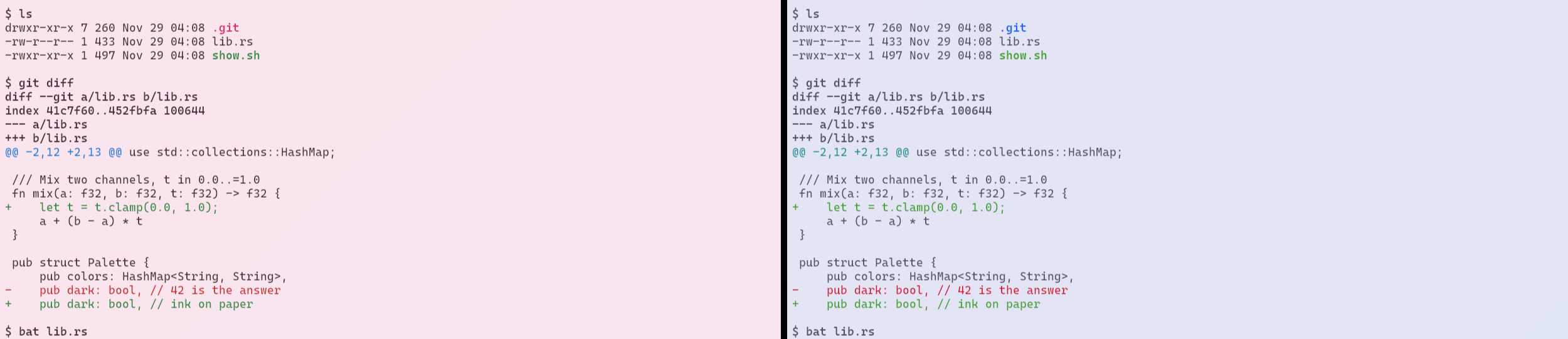
Dark ANSI palettes don't survive being flipped to light. If a light theme doesn't ship its own [terminal] block, the engine builds one differently from the dark case: "black" becomes the ink color so it stays readable on paper, the hues get picked from the theme's own accents, and the "bright" variants are darkened by 18% instead of lightened. Dark themes do the opposite and lighten each hue by 22%.
Making apps actually change
Writing a file doesn't recolor anything on its own. How an app picks the file up is the messy part, and I'm glad I split it into two kinds of target.
Template targets write a file the app already watches. kitty, Zellij, Zed, Neovim, Obsidian and Noteism reload when their config or theme file changes, so they just flip. Others read the file at startup, so they pick it up the next time you open them.
Hook targets also have to make the app use the file. VS Code needs workbench.colorTheme set to the right entry (dark or light). Kate, Geany, qBittorrent, Typora, micro, bat, Codex and Zed each need one setting flipped. The hook does that and leaves everything else in your settings file alone, and where the format allows, it keeps your ordering, comments and formatting.
There's a nasty little class of apps that rewrite their whole config when they quit (Geany, qBittorrent and Typora do this). If I flip their setting while they're running, they'd undo it on exit. So the one-time "use the CLOUDWERX theme" setting is only written while they're closed, and cloudwerx theme targets says "close X once" if it's waiting. After that, every switch only touches the theme file.
Discord, and the evil part
Discord has no theme file I can write. So discord.desktop in the launcher doesn't start Discord directly. It runs cloudwerx theme launch discord, which starts Discord with a private DevTools port bound to loopback, then runs a small script (apps/theme-inject/inject.mjs) that injects a stylesheet into the running app. Every theme switch, the script injects the new CSS again, and it re-injects on reloads too. If you use Vencord, Vesktop or BetterDiscord, the stylesheet also gets written to their theme folders.
The catch is that it only works for an instance that was started that way. If you open Discord some other way, there's no port to talk to, so you have to start it from the launcher once. I think that's a fair price for a Discord that matches my terminal.
Telegram, the opposite approach
Telegram Desktop has no theme command either, but it does watch a palette file. So the engine rewrites a full .tdesktop-palette on every switch, and Telegram recolors within a second or two. You select it once (Settings, type loadcolors, point it at the file) and then it just follows. The template is made from Telegram's own stock palette, with every color key named, so no dialog falls back to default blue.
Even the AI tools
Claude Code gets a custom theme file with all 72 color slots, selected as custom:cloudwerx, and if you picked a different custom theme yourself, it leaves yours alone. The replies I read in the terminal go through a markdown renderer called Prismantis, and its 20 color tokens (headings, tables, code, links, diagrams, charts) are written into its plugin config and pushed toward the text color until each one reads on the terminal background. Same readable trick again. The Codex CLI gets a syntax theme. Three different agent UIs, and they all look like they belong to the same machine.
Switching, and the reveal
If a theme change was just apps recoloring one after another, you'd see a ripple of half-changed windows. It looks cheap and I hate it. So I made the whole change happen behind a frozen screenshot.
sequenceDiagram
  participant C as cloudwerx CLI
  participant S as Shell
  C->>S: prepare
  S-->>C: still taken (or busy, locked, off)
  C->>S: ready
  Note over C: apply theme, set wallpaper, no transition of its own
  C->>S: settled?
  S-->>C: new palette loaded
  C->>S: reveal
  Note over S: shader plays over the frozen still
The shell grabs a still of every screen and holds it up. Under it, the theme and wallpaper change with the shell's own color animations switched off, so nothing is fading around behind the freeze. Then the chosen effect reveals the new look. reveal always runs, even if something errored along the way, and if the CLI never asks for it, the shell reveals by itself after 10 seconds so you can never get stuck behind a frozen picture.
If there's no shell running, the screen is locked, or the transition is set to none, the theme just changes immediately with no freeze. And if the compiled shader isn't there, you get a plain crossfade. I wanted every failure to land on "still works, just less pretty".
The effects are the same GLSL shader the wallpaper transitions use, and there are dozens of them: Ink bloom is the default, then Water ripple, Shatter, Prism, Melt, Burn, Glitch, Swirl and a pile of classic sweeps and iris effects. The radial ones start where you clicked in the theme switcher.
Those are the knobs, if you want to play:
cloudwerx theme transitions                 # list them, a dot marks the active one
cloudwerx theme transitions set prism       # new default
cloudwerx theme transitions duration 1.2
cloudwerx theme transitions try swirl       # play one over the screen without changing the theme
cloudwerx theme set nord --transition shards --origin 1200,40   # once, from a point
Does every theme actually work?
Here's the part where I'm a little proud. cargo test goes through all 68 theme files and checks that the palette is complete, that text hits 4.5 to 1 on both the background and the panels, that accents and status colors are visible, that light and dark surfaces are ordered the right way round, and that each theme's counterpart really exists. A second test renders every template for every theme and fails if a {{placeholder}} is left over or a JSON or TOML output doesn't parse.
I wanted real numbers instead of just trusting the test names, so I ran the same contrast formula over all 68 files myself:
| Check | Result across 68 themes |
|---|---|
Median text on bg |
12.95 to 1 |
Lowest text on bg |
5.61 to 1 (Solarized Dark) |
Highest text on bg |
19.10 to 1 (Material Ocean) |
Lowest text on surface |
4.86 to 1 (Solarized Dark) |
Lowest accent on bg |
3.29 to 1, with 3.0 as the floor |
Solarized is the lowest on both, which fits its reputation for low contrast, and even it clears 4.5 for body text. If I paste in a palette where the text is too dim, the test fails before it ever reaches my screen.
[!NOTE] Those numbers are from my own script using the same WCAG math as the engine, run over the TOML files. The authoritative check is the Rust test in the repo. I ran mine because I wanted to see the spread, not just a green checkmark.
The dynamic theme
The dynamic theme isn't a file in the repo. cloudwerx theme generate takes the current wallpaper and builds a palette with matugen, the Material You color tool. For a video wallpaper it grabs a frame first (the one on screen if it's playing, otherwise the middle one), and runs matugen in dark mode with a preference for saturation. Then it maps Material's roles onto my 14:
| My color | Material role |
|---|---|
bg |
surface_container_lowest |
surface |
surface_container_low |
surface_raised |
surface_container_high |
overlay |
outline_variant |
text, text_muted, text_dim |
on_surface, on_surface_variant, outline |
accent, accent2, accent3 |
primary, tertiary, secondary |
danger, on_accent |
error, on_primary |
Material has no "success" or "warning" roles, so those two are fixed tones I picked (a soft green and a soft amber). Everything after that goes through the exact same derived-tone and readability machinery as a hand-made theme, which is why a theme built from a random photo still has legible comments and links. It never needed a special case.
Add your own
If you run this OS, a theme is one file:
cd ~/Code/cloudwerx-os/themes
cp vercel.toml mine.toml
$EDITOR mine.toml
cloudwerx wallpaper generate mine
cloudwerx theme set mine
And adding a new app to the engine is five steps from my docs: write templates/<app>.<ext> using the keys, add a target entry to manifest.toml, write a hook if the app needs its theme selected, run cargo test (which renders it for every theme), then cloudwerx theme reapply.
What I might change
Mixing happens in plain sRGB. It's simple and the contrast tests keep the results honest, but sRGB blends can look muddy in the middle, so a perceptual space like OKLCH is something I'd like to try for the derived tones. I haven't tried it yet, so I can't tell you it would look better. It's on the list.
Apps that can't be themed are listed on purpose too. Spotify, Steam and Beeper have closed UIs with no config-file API, so they keep their own look. SDDM, the login screen, is handled on its own page in Settings so a theme change can never touch PAM or the running display manager. I'd rather have a handful of honest gaps than a theme engine that reaches into the login stack.
That's the engine. 14 colors in, a pile of derived tones, 36 apps on this machine, and a shader on top. If you've got a favorite palette that isn't in the 68, tell me, I'll add it. And if you've found a way to theme Spotify without breaking it, I definitely want to hear about it.
Ty CLOUDWERX LAB, Digital Food for the Analog Soul cloudwerxlab.com · github.com/CLOUDWERX-DEV
Sources
- WCAG 2.2 technique G18: contrast ratio of at least 4.5:1, where the relative luminance and contrast formulas live
- Understanding SC 1.4.3 Contrast (Minimum), W3C
- WebAIM: Contrast and Color Accessibility
- matugen, Material You palettes from an image
- folke/tokyonight.nvim, the Tokyo Night family
- The CLOUDWERX OS theme engine (
cli/src/theme.rs) and itsTHEMES.md, which is the source for every number and flow above that isn't marked as my own measurement