Press undo on your whole OS
Btrfs snapshots, a paranoid root helper, and a rollback that renames instead of rewrites
By Ty · · 10 min read · systems
Tags: #cloudwerx-os #btrfs #snapper #linux #cachyos #recovery #python #security
A few nights ago I applied my login screen theme four times in about three minutes, and my machine took a snapshot before every single one. I didn't have to remember to do that. It just happens.
That habit is the whole reason I can keep tearing apart my own operating system at 1am without a plan B. Underneath it is Btrfs, Snapper, a tiny root helper I wrote, and a rollback routine I'm weirdly proud of. This is how it all fits together, with real numbers from my real machine. The picture up top is every snapshot on it, one bar each: orange is protected, green is manual and blue is a pacman before or after.
What a snapshot actually is
I'll skip the marketing version. A Btrfs snapshot is a subvolume that starts out sharing every data block with the thing you snapshotted. The Btrfs docs say it plainly: it's a subvolume like any other, and changing files in one doesn't touch the other. The design notes describe how, it's copy on write, so taking one just bumps a reference count on the root of the tree. Writes after that go to new blocks and the old ones stay put, held by the snapshot.
That's why they're so cheap. I didn't want to just repeat that though, so I measured it. I made a 1 GiB Btrfs image in /tmp, mounted it on a loop device, dropped a 300 MiB file of random bytes in a subvolume, and snapshotted it.
$ btrfs filesystem df .          # before
Data, single: total=456.00MiB, used=300.00MiB
Metadata, DUP: total=51.19MiB, used=512.00KiB

$ btrfs subvolume snapshot -r @ snap1
Create readonly snapshot of '@' in 'snap1'      # 0.017 s total, wrapper included

$ btrfs filesystem df .          # after
Data, single: total=456.00MiB, used=300.00MiB
Metadata, DUP: total=51.19MiB, used=528.00KiB
Data didn't move. Metadata grew by 16 KiB. That's the cost of a snapshot of a 300 MiB tree, and it came back in a few hundredths of a second.
Then the part that matters. I deleted the 300 MiB file from the live subvolume and edited the config file next to it.
$ rm @/big.bin; echo 'port=9999' > @/app.conf
$ btrfs filesystem df .
Data, single: total=456.00MiB, used=300.00MiB    # still 300, the snapshot is holding it

$ cat snap1/app.conf
port=8080                                        # the old value, untouched

$ btrfs filesystem du -s snap1 @
     Total   Exclusive  Set shared  Filename
 300.00MiB   300.00MiB       0.00B  snap1
     0.00B       0.00B       0.00B  @
Look at that last table. After the delete, the 300 MiB belongs entirely to the snapshot (exclusive), and the live subvolume owns nothing. Space only comes back when the last thing pointing at those blocks goes away. That's the one thing to remember about snapshots, they cost nothing on day one and the bill arrives as you change stuff. It's also why I keep a number limit on them.
[!WARNING] Snapshots are not backups A snapshot lives on the same disk as the thing it protects. The Btrfs docs say this too. If the SSD dies, they die with it. Mine covers
/only, and my home folder is its own subvolume that isn't in the root config. I back up the files that matter somewhere else.
The stack, from the bottom up
CachyOS ships a Btrfs layout that's ready for this, and I just build on it. Here's what's doing the work on my box.
| Piece | What it does |
|---|---|
Btrfs, root on subvolume @ |
mounted with compress=zstd:1,noatime,ssd,discard=async according to findmnt |
Snapper root config |
snapshots / and keeps a list with numbers, types and cleanup rules |
| snap-pac | pacman hooks that take a pre and a post snapshot around every transaction, and log the command in the description |
| limine-snapper-sync | writes a boot menu entry for each snapshot, so you can boot an old one |
snapper-cleanup.timer |
prunes old snapshots on the limits you set |
You can see snap-pac's work in my list. Every pacman run is a Before and an After, and the After's description is the list of packages that changed. That's how #344 is just a pile of names after I removed appimagetool-bin.
#342  remove appimagetool-bin                       Manual   (mine, protected)
#343  pacman -Rns --noconfirm appimagetool-bin      Before
#344  appimagetool-bin libappimage squashfuse ...   After
Three snapshots for one package removal, and I only asked for one of them.
Where I came in
CachyOS gives you Snapper and Limine already, so you can do all of this from a terminal today. I didn't want to type snapper -c root undochange 343..344 at 1am with a dead desktop, so I built a whole page for it. It's called Settings › Snapshots, there's a cloudwerx snapshot command for the terminal, and the same data feeds both.
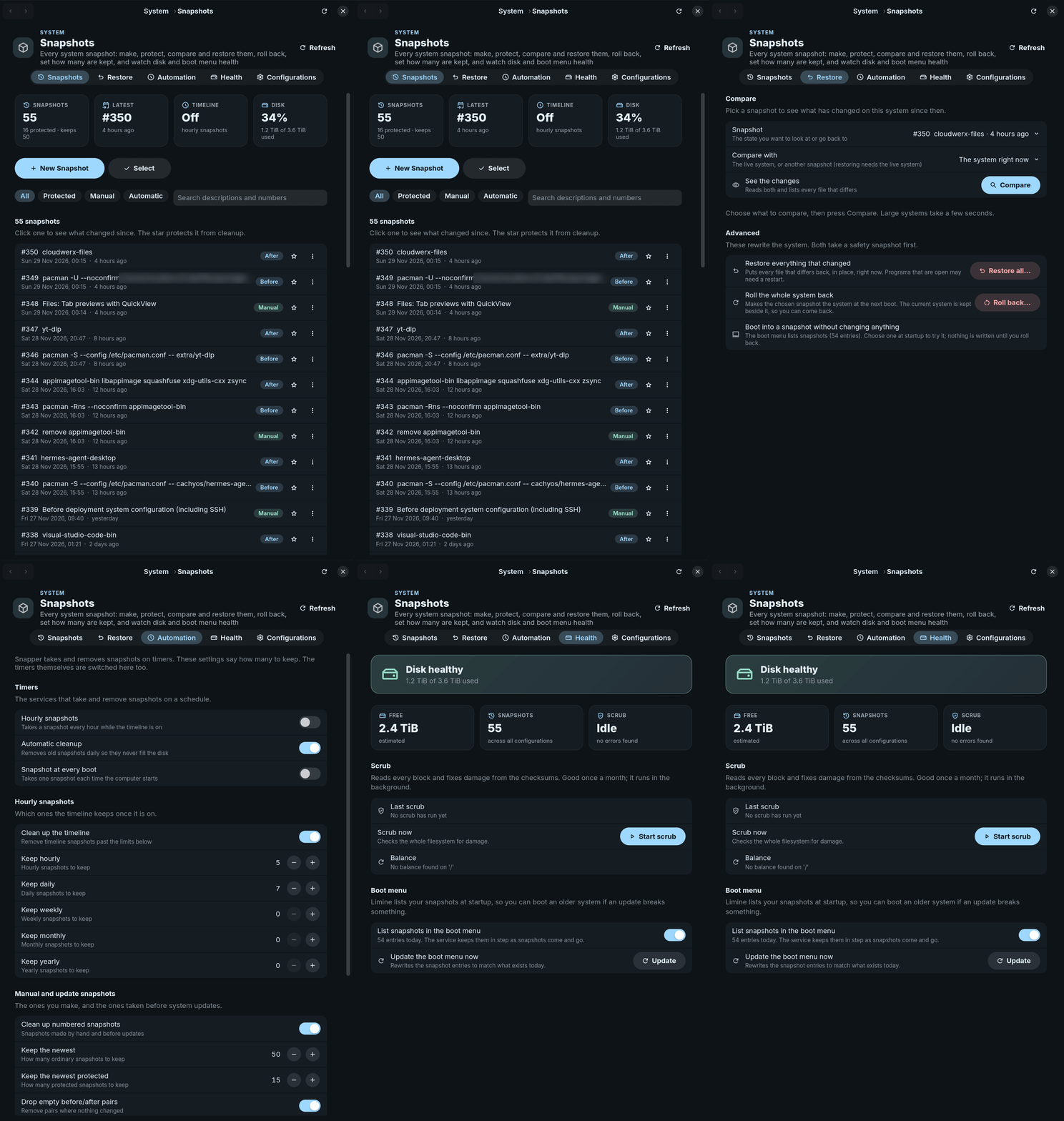
Here's the page doing a lap of four of its five tabs, on my real data.
The list
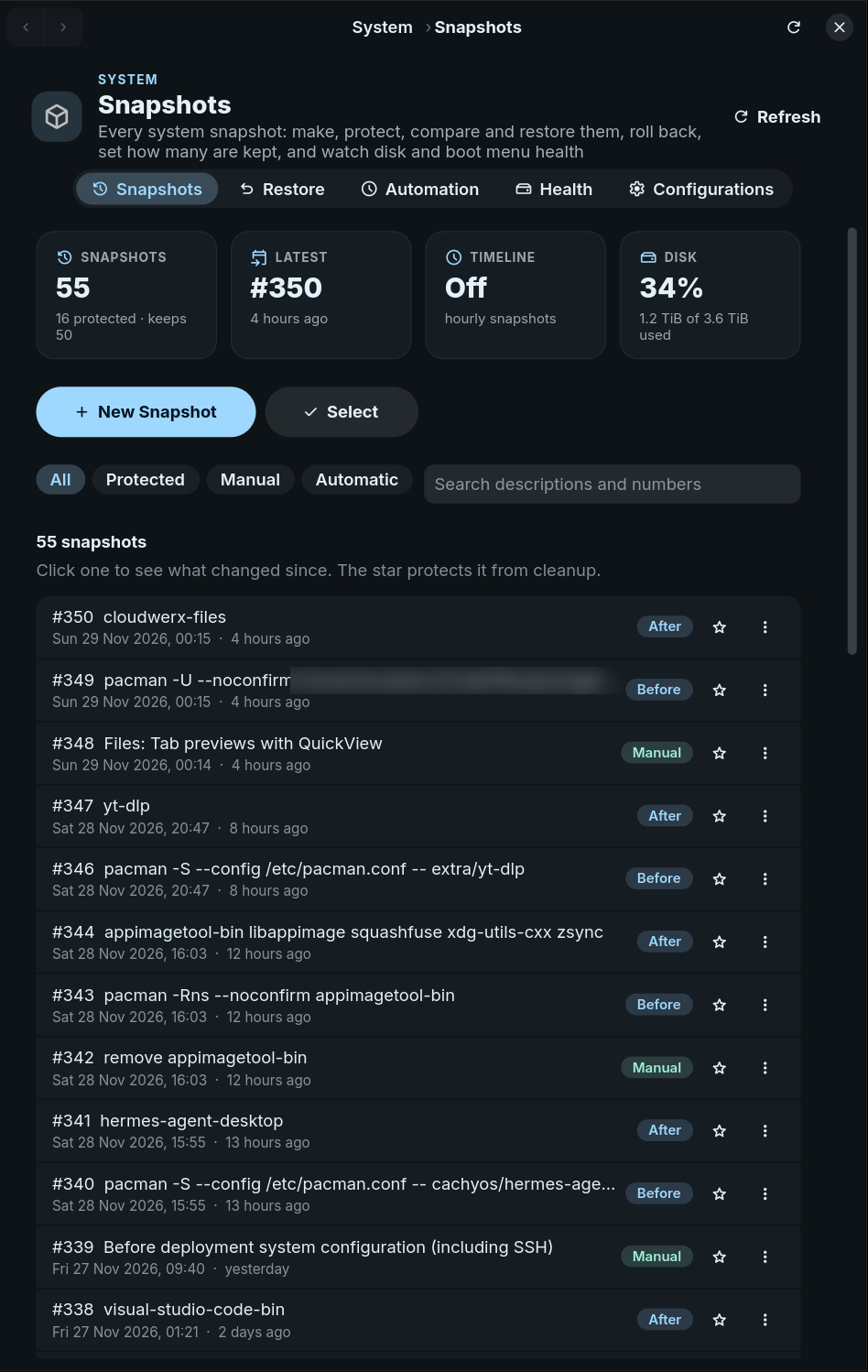
Every row says where it came from. Manual, Before, After, and Update for the one the system takes before a full update. The star protects a snapshot from cleanup, protected ones ask you to type DELETE before they go, and the one you're running right now can't be deleted at all. I blurred a file path out of #349 because it had my username in it, the rest is exactly what's on screen.
Some of those manual ones aren't mine. The OS takes them before it does anything scary. Updating from the desktop tools runs this, in this order:
commands = [[str(CW), "snapshot", "create", "Before CLOUDWERX system update"],
            ["sudo", "pacman", "-Syu"]]
Snapshot first, update second, always. Applying a login screen theme does the same thing first. The four Before applying CLOUDWERX login screen snapshots in my list, #312 to #315, were taken between 01:07 and 01:10 on the 27th, so I'm guessing that was me retrying it in a hurry. I'm not even a little embarrassed. That's what they're for.
flowchart TD
  A[Update or risky change] --> B[Named snapshot<br/>Before CLOUDWERX system update]
  B --> C[snap-pac pre snapshot]
  C --> D[pacman transaction]
  D --> E[snap-pac post snapshot]
  E --> F{Still works?}
  F -->|Yes| G[Carry on, cleanup prunes later]
  F -->|No| H[Compare, restore files, or roll back]
Restore
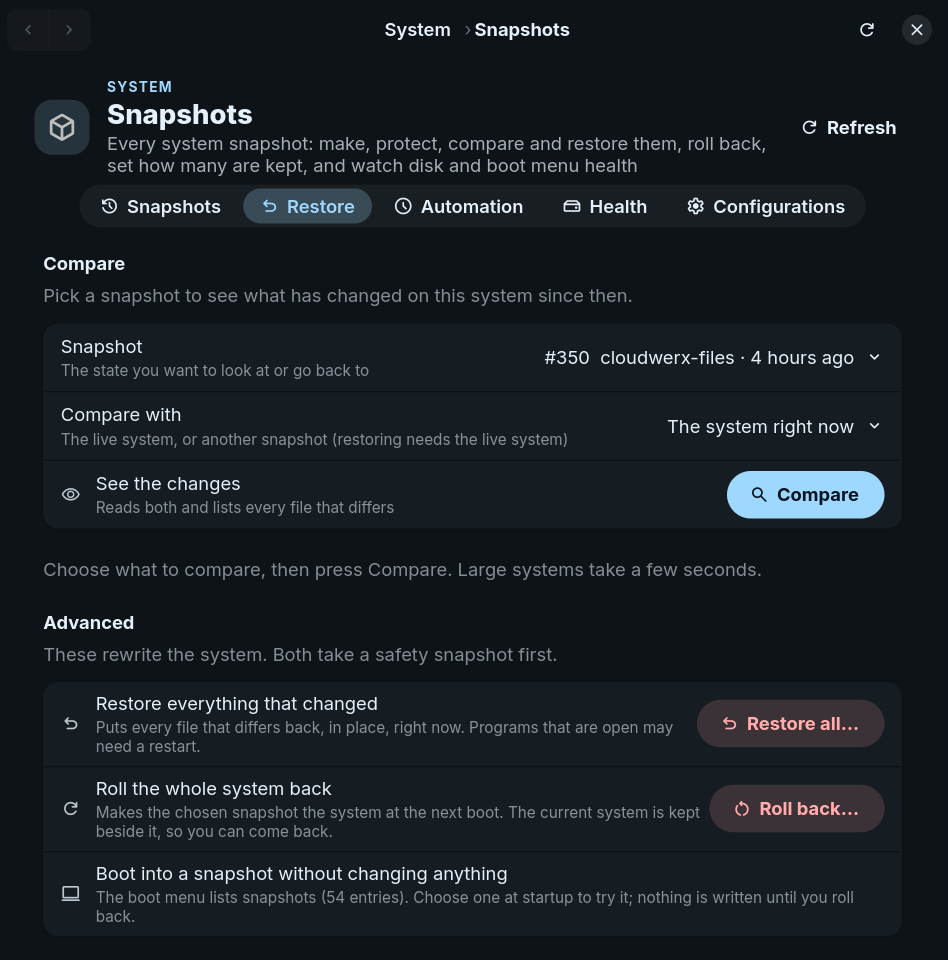
There are three levels, and they get scarier as you go down.
- Compare. Pick a snapshot, press the button, and it lists every file that differs from the live system, grouped by folder. You can read the diff of any file from there. Nothing is written.
- Restore one file or one folder. Put back just the thing you wrecked. Or restore everything that changed, which runs
snapper undochange N..0after taking a safety snapshot of the current state first. - Roll the whole system back. The chosen snapshot becomes
/at the next boot, and the system you were running is kept next to it so you can come back.
And there's a fourth way that needs no UI at all. Limine lists snapshots in the boot menu, so if the desktop won't even start you pick one at startup, try it, and nothing is written until you decide to roll back. I currently have 54 boot entries, according to the page.
[!NOTE] Mind your boot partition limine-snapper-sync writes those entries into your boot partition. A CachyOS forum thread reports entries stopping once that partition passed an 85% usage limit, and suggests capping
MAX_SNAPSHOT_ENTRIES. If your boot menu stops growing, check/bootspace first.
Automation
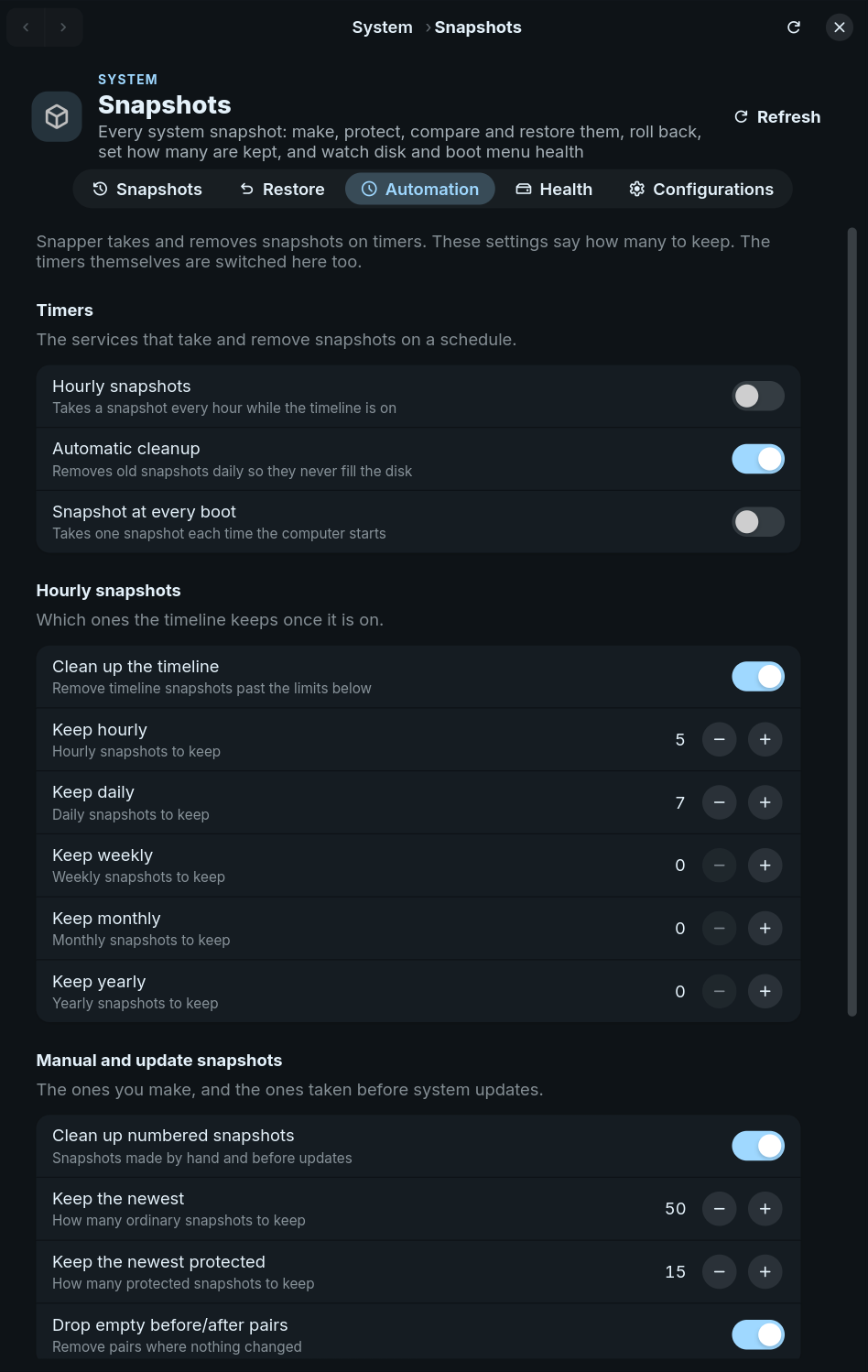
Snapper runs on timers. Hourly snapshots, a daily cleanup, a snapshot at every boot, and all the limits that decide how many to keep. On mine hourly and boot snapshots are off, since pacman and my own tools already snapshot before the things that matter. Cleanup is on, and the limits are 50 ordinary and 15 protected.
That gives you some simple math. Each pacman run costs two slots, a before and an after.
$$ \left\lfloor \frac{50}{2} \right\rfloor = 25 $$
So roughly 25 package transactions of history, if I never made a manual snapshot, and they'd share those slots with everything else that's tagged to be cleaned up by number. You can see that squeeze on the cover. Almost everything is bunched up in the last five days, because the older pairs got pruned. What survived are the protected ones: #6, the fresh install, then #204, then a run from Nov 25 onward. The numbers in between are just gone, and that's cleanup working as designed.
Health
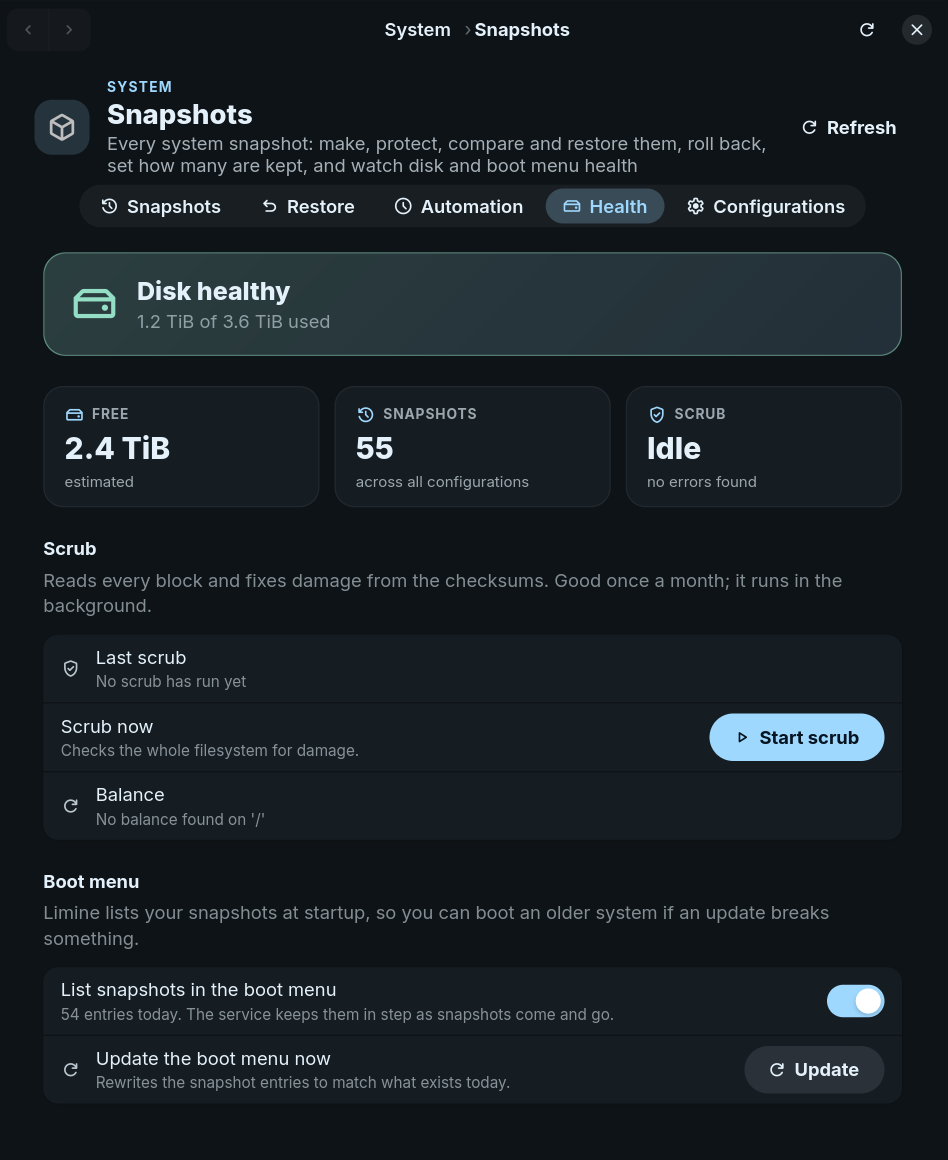
This one's just a dashboard. 1.2 TiB used of 3.6 TiB, 2.4 TiB free, and a scrub button. It's also a tiny bit of public shaming, because it says No scrub has run yet on my machine. A scrub reads every block and checks it against its checksum. The page tells you to do it about once a month. I'll do it right after I finish writing this.
The part I like most: how it gets root
Restoring a system needs root, and I don't want a GUI app with a root shell. So the Settings app never runs snapper as root itself. There are two small Python programs installed root-owned in /usr/local/lib/cloudwerx, and they're only reachable through polkit.
cloudwerx-snapshots-statusis read only. It can list snapshots, diff two of them and show a file diff. It can't change anything, and it doesn't ask for a password for the active session.cloudwerx-snapshotsdoes the changes. It asks for your password once and then remembers for a few minutes.
The second one is the interesting one. It never trusts what it's given. Every config name has to match a strict pattern and exist, every number has to be a positive integer, descriptions are one line with a length cap, and every path has to be absolute, contain no .., and sit inside the subvolume being snapshotted. Settings keys come from an allow-list.
def under(subvolume, path):
    """path is absolute, has no .. and sits inside the configured subvolume."""
    parts = Path(path).parts
    if not path.startswith('/') or '..' in parts or any(ord(c) < 32 for c in path):
        raise Refused('Use an absolute path without "..".')
    base = Path(subvolume).resolve()
    if base != Path('/') and not (Path(path) == base or base in Path(path).parents):
        raise Refused(f'{path} is outside {subvolume}.')
    return path
And before it rewrites anything, whole-system undo and rollback both take their own safety snapshot, marked important so cleanup leaves it alone.
def safety_snapshot(config, why):
    """A snapshot of now, kept as important, before a change that rewrites files."""
    out = snapper(config, 'create', '--type', 'single', '--cleanup-algorithm', 'number',
                  '--print-number', '--description', why, '--userdata', 'important=yes')
    return out.stdout.strip()
Deletes have guards too. You can't delete the snapshot you booted from or the one that boots next, and protected ones need an explicit force flag, which is what the typed DELETE in the UI turns on.
The Settings side has a test file of its own, 14 tests, and the helper's refusals are covered in there too.
The rollback routine
This is the bit I'm proudest of, so humor me.
The classic way to roll back a Btrfs root is to change the default subvolume, which is what openSUSE used to do. People have argued for years about that. The openSUSE docs describe the layout, and a mailing list thread from 2015 has a developer calling it a design flaw, because the default subvolume is supposed to be the user's to choose.
CachyOS boots a subvolume called @ by name, so I don't touch the default at all. I swap the name. The helper:
- Refuses unless root really is on
@. Any other layout and it says no, because it doesn't know what it would be breaking. - Takes a safety snapshot.
- Mounts the top level of the filesystem somewhere temporary.
- Makes a writable copy of the snapshot, renames the live
@to@before-rollback-<time>, moves the.snapshotsfolder across so the history comes with it, and renames the copy to@. - Asks limine-snapper-sync to rebuild the boot entries.
sequenceDiagram
  participant H as helper (root)
  participant B as Btrfs top level
  H->>B: snapshot of snapshot N into @rollback-N-time
  H->>B: rename @ to @before-rollback-time
  H->>B: move .snapshots into @rollback-N-time
  H->>B: rename @rollback-N-time to @
  Note over H,B: any step fails, rename the old @ back and delete the copy
  H->>H: restart limine-snapper-sync
The running system doesn't notice any of this. It keeps running on the old @ until the next boot, and the next boot comes up on the new one. The old system hasn't been deleted, it's sitting right there with a timestamp on it. If I regret the rollback I can undo the rollback.
        try:
            leftover = top / new / SNAPSHOTS_DIR
            if leftover.is_dir() and not any(leftover.iterdir()):
                leftover.rmdir()
            os.rename(top / old / SNAPSHOTS_DIR, top / new / SNAPSHOTS_DIR)
            os.rename(top / new, top / '@')
        except Exception:
            os.rename(top / old, top / '@')
            if (top / new).exists():
                run('btrfs', 'subvolume', 'delete', top / new, check=False)
            raise
If anything throws halfway through, the old @ gets its name back and the half built copy gets deleted. The idea is that the worst case is nothing happened. Renames on the same Btrfs filesystem are atomic, which is what makes this safe to do from a script.
I haven't pressed Roll back on my daily driver for this post, and I'd rather say so than pretend. What I did run for real is the loop-mounted image from earlier. If you want to poke at snapshots without risking your system, do the same.
truncate -s 1G test.img && mkfs.btrfs -q test.img
mkdir mnt && sudo mount -o loop,compress=zstd:1 test.img mnt
sudo btrfs subvolume create mnt/@
sudo btrfs subvolume snapshot -r mnt/@ mnt/snap1
sudo btrfs filesystem du -s mnt/snap1 mnt/@
It costs nothing and it teaches you more than reading docs does. Unmount and delete the image when you're done.
What I'd tell you to take away
- Snapshot before you change things, and let the machine do it for you. pacman hooks, update commands and risky config changes should all take one without you remembering to. The one you forget is the one you need.
- Name them.
Before applying login screenbeatssnapshot 312when you're staring at fifty of them half asleep. - Protect the ones that matter. Cleanup is a feature, but it will happily prune the one you wanted. Star the keepers.
- Know what's not covered.
/homeisn't in my root config, and snapshots aren't backups. - Keep the root part tiny and paranoid. A privileged helper that validates everything and only does a handful of things is something I can reason about at 1am. A GUI with a root shell isn't.
This is also why I'm so willing to experiment with things like QuickView and the theme engine. The snapshot named Files: Tab previews with QuickView is from a few hours before I wrote this paragraph. I made it, tried the thing, and if it had broken the file manager I'd have been one click from yesterday.
Press undo on your whole OS. It's the most freeing feature I own.
Sources
- Btrfs docs: Subvolumes and snapshots
- Btrfs design notes (copy on write and reference counts)
- ArchWiki: Btrfs and ArchWiki: Snapper
- snap-pac(8) man page and the project on GitHub
- limine-snapper-sync on the CachyOS package index
- CachyOS forum: Limine Snapper Sync stopped entry creation
- openSUSE Reference: Snapper and the 2015 rollback discussion
- Everything else came from my own machine: the snapshot list, the Settings page screenshots, the helper source and the loop mounted test image.