Press Space on any file and see it: building QuickView in Rust
How I built a Linux Quick Look clone on GPUI with a 3D software renderer, native Mermaid and math, D-Bus hooks and zero-rebuild mods
By Ty · · 16 min read · systems
Tags: #cloudwerx-os #rust #gpui #wayland #niri #linux #3d #dbus
One of the few things macOS nailed years ago and never messed up is Quick Look. Click a file in Finder, tap Space, look at it for two seconds, tap Space again, move on. You don't open LibreOffice just to check if report-final-v3.docx is actually the right spreadsheet, and you don't spin up Blender to see which .obj file is the right bracket.
Linux has had attempts at this for over a decade, and almost all of them feel fragile or tied to a single desktop environment. GNOME has Sushi for Nautilus. Linux Mint forked it into nemo-preview for Nemo. Both haul in GJS, Clutter, WebKit or Evince bindings, and if you live on a Wayland tiling compositor like niri instead of GNOME Shell, half of the focus and window placement behavior falls apart anyway.
So I built my own for CLOUDWERX OS. It's called QuickView (apps/quickview), it's 3,701 lines of Rust on GPUI and GPUI Kit, it follows my active desktop theme automatically (see one-palette-every-app), and it answers the exact D-Bus call my file manager already makes when you hit Space.
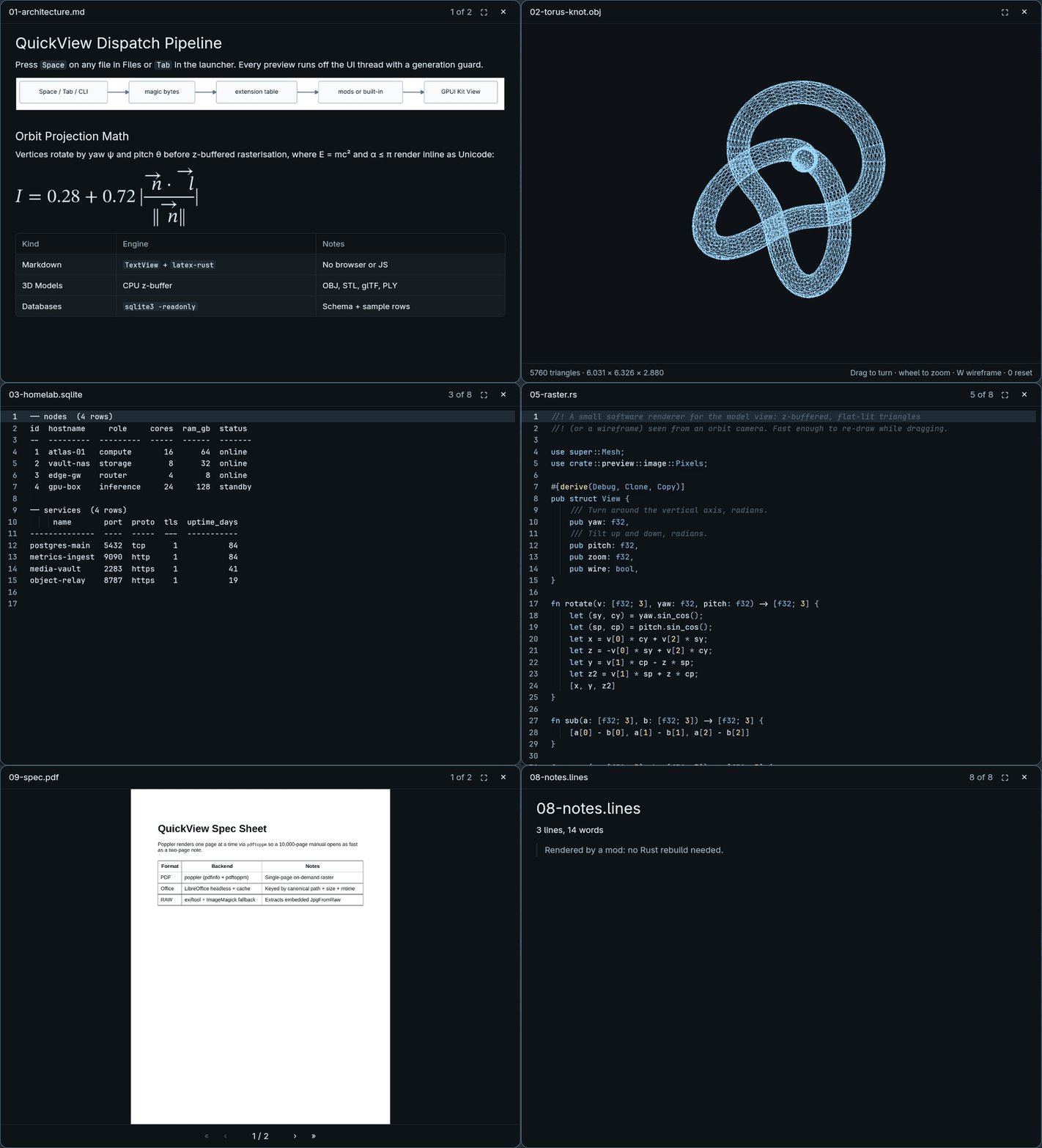
Every screenshot and recording in this post comes straight off my machine running QuickView in an isolated demo session on clean test files. Here's how the whole thing works under the hood, including the two Wayland and D-Bus bugs that nearly made me throw my keyboard out the window.
Why a warm single-instance process matters
The entire point of a Spacebar previewer dies if it takes 800 milliseconds to cold-start a GPU context every time you look at a PNG.
QuickView runs as one warm process per login session. The first time you preview anything (or when org.nemo.Preview D-Bus activation starts quickview serve in the background), it acquires a non-blocking exclusive flock on $XDG_RUNTIME_DIR/cloudwerx-gpui/com.cloudwerx.quickview.lock inside a 0700 directory and binds a matching Unix socket.
After that, every subsequent call (quickview next, quickview prev, quickview toggle, quickview close, quickview clipboard) grabs the lock, sees EWOULDBLOCK, sends one JSON line with its verb and XDG_ACTIVATION_TOKEN over the socket, waits for ok, and exits. Closing the preview window only removes the window (window.remove_window()); the GPUI app and its GPU state stay warm in memory. A lightweight timer wakes up every 30 seconds and shuts the daemon down only after idle_quit_minutes (30 minutes by default, or 0 if you want it resident forever).
flowchart LR
  CLI["CLI / Super+Alt+Q"] -->|JSON line + token| Sock["com.cloudwerx.quickview.sock"]
  Files["Files (Space / Tab)"] -->|D-Bus org.nemo.Preview| DBus["zbus interface"]
  Launcher["Shell Launcher (Tab)"] -->|--over flag| Sock
  DBus --> Bus["Internal mpsc channel"]
  Sock --> Bus
  Bus --> Apply["apply(verb, over)"]
  Apply -->|normal| Win["980x720 Floating Window"]
  Apply -->|--over| Layer["wlr-layer-shell Overlay"]
Keeping a separate Cargo workspace for apps/quickview ended up being mandatory for a boring dependency reason too: QuickView pulls gpui-kit 0.11.0 and gpui-shell 0.11.0, while the rest of CLOUDWERX OS pins 0.7. Cargo won't resolve two major versions inside one workspace, so apps/quickview sits in its own workspace and compiles to a single stripped release binary (opt-level = 3, lto = "thin") sitting at ~/.local/bin/quickview. I won't pretend it's tiny, though. With gpui-kit, tree-sitter-languages, resvg, latex-rust, and mermaid-rs-renderer all compiled in, the stripped binary is 105.7 MiB (110,831,256 bytes). For an instant-open desktop tool that needs zero runtime dependencies like Electron or Python, I'll happily trade a hundred megabytes of NVMe for zero startup lag.
Even the clipboard hotkey (Super+Alt+Q, calling quickview clipboard) has a neat little trick in src/clipboard.rs. On Wayland, copying a file inside Files puts a percent-encoded text/uri-list (file:///...) on the clipboard, whereas copying a path out of a terminal puts text/plain (~/notes/todo.md or /etc/fstab) there instead. So clipboard::read() probes wl-paste --no-newline -t text/uri-list first and falls back to text/plain, percent-decodes URIs, expands ~/, and ignores anything that doesn't resolve to a path. Multiple selected files go into Session in order with duplicates dropped, and arrow keys wrap cleanly around the whole batch.
The D-Bus signature trap in Files
I didn't want to maintain a patched fork of Nemo just to send a custom IPC message when you press Space. Nemo already talks to org.nemo.Preview on the session bus (/org/nemo/Preview) whenever you hit Space on a selected file. That's the whole Sushi protocol.
So I wrote a 57-line zbus server in src/dbus.rs that claims org.nemo.Preview, handles ShowFile(uri, xid, close_if_visible) and Close(), decodes file:// URIs, and forwards Verb::Open or Verb::Toggle into the exact same channel the CLI socket uses.
And then Space in Files did absolutely nothing.
Not a crash, not an error dialog, just silence. When you inspect what Nemo actually sends over GLib (g_variant_new("(sib)", uri, xid, close_if_visible)), that middle xid argument is a signed 32-bit integer (i32, D-Bus signature 'i'), not an unsigned u32 ('u'). In Rust, declaring _xid: u32 feels natural for a window ID, and zbus happily exports a (sub) signature that silently rejects every (sib) call from Files with an invalid-arguments error.
Changing that single parameter to _xid: i32 made Space in Files light up instantly with zero changes to Files itself. I added a regression test in tests/dbus.rs that renders introspection_xml() and asserts the exported parameter types are literally ["s", "i", "b"] so nobody accidentally changes it back.
[!NOTE]
install/deploy.shwrites~/.local/share/dbus-1/services/org.nemo.Preview.servicepointing atquickview serve. If another previewer already owns the bus name,dbus::servereturns an error on startup and logs it, leaving the other previewer in peace instead of fighting over the bus.
Two Wayland window modes: why overlay mode needs Layer-Shell
Opening QuickView from a file manager or a terminal is easy: ask GPUI Kit for a centered 980x720 floating window (min_size 420x320) with server decorations.
Except on Wayland, two annoying things happen right away.
First, niri doesn't always honor a background process asking to activate its own newly opened window. Without focus, you hit Space to open a 3D model, press W for wireframe, and the W goes straight into whatever terminal or editor was sitting behind QuickView. My workaround in raise() is blunt and effective: spawn a thread that polls niri msg --json windows (up to 80 checks, 50 ms apart) looking for app_id == "com.cloudwerx.quickview" matching our pid, and call niri msg action focus-window --id <id>.
Second, opening QuickView from my Quickshell app launcher with Tab broke completely as a normal floating window. The launcher lives on the Wayland wlr-layer-shell overlay layer. On Wayland, a regular xdg_toplevel window can never paint above a layer-shell surface. You'd hit Tab on a file in search results and QuickView would pop up behind the launcher where you couldn't even see it.
The fix was --over. When --over is passed (which the launcher sends, and which you can call from a terminal), QuickView skips gpui_kit::open_window entirely because GPUI Kit's Root wrapper paints an opaque frame with its own margin. Instead, it calls cx.open_window directly with WindowKind::LayerShell on Layer::Overlay:
WindowOptions {
    app_id: Some(APP_ID.to_owned()),
    kind: gpui_kit::WindowKind::LayerShell(LayerShellOptions {
        namespace: "cloudwerx-quickview".into(),
        layer: Layer::Overlay,
        anchor: Anchor::TOP | Anchor::BOTTOM | Anchor::LEFT | Anchor::RIGHT,
        exclusive_zone: Some(px(-1.)),
        exclusive_edge: None,
        margin: None,
        keyboard_interactivity: KeyboardInteractivity::Exclusive,
    }),
    window_background: gpui_kit::WindowBackgroundAppearance::Transparent,
    ..Default::default()
}
The surface stretches across the entire output with a near-invisible 0x0000_0001 backdrop, keeping the launcher visible underneath while catching clicks outside the centered 980x720 rounded card to dismiss it. Even nicer: hitting F in overlay mode doesn't need to negotiate compositor fullscreen at all. It just toggles self.expanded and grows the card to fill window.viewport_size(), edge to edge, right over the bars.
And if you're already looking at a file in normal window mode and trigger --over (or vice versa), apply() closes the old window and opens the right kind automatically, because Wayland won't convert an xdg_toplevel into a wlr-layer-shell surface in place.
File typing: why magic bytes aren't enough
You might think file type detection is just calling infer on the first few kilobytes and calling it a day. Try that on real files and everything misbehaves.
Camera RAW files (.cr2, .nef, .arw, .dng) are TIFF containers under the hood, so magic-byte sniffers classify them as TIFF images and decode the tiny embedded thumbnail instead of extracting the full-res preview JPEG. Office documents (.docx, .xlsx, .pptx) are ZIP files under the hood, so magic-byte sniffers classify them as archives. On the flip side, .ts is a TypeScript source file 95% of the time, except when it's an MPEG Transport Stream video. And plenty of downloaded PDFs have wrong extensions or a few bytes of junk before %PDF-.
So detect() in src/kind/mod.rs reads 8192 bytes (SNIFF = 8192) and runs a deliberate precedence order:
- Scan the first 1,024 bytes for
%PDF-directly so even a misnamed PDF opens as a PDF. - Check both magic bytes (
infer::get) and the extension table (ext::by_extension). - Let magic bytes win for
Image,Video,Audio, andFontonly if the extension isn't one of the specific container overrides (Raw,Svg,Model3d,Office,Video,Audio,Image). That single rule fixes both.tsvideos (magic wins!) and.docx/.cr2files (specific extension beats ZIP/TIFF magic!). - If nothing matched, check
looks_like_text: noNULbytes, and valid UTF-8 (allowinge.error_len().is_none()so a multi-byte UTF-8 character cut in half at byte 8192 doesn't falsely trigger hex mode). - Everything else drops into a 256 KB capped hex dump.
[!TIP] Every preview loader runs inside
cx.background_spawn, guarded by a monotonicself.generationcounter onViewer. If you mash the right arrow key across ten huge PDFs and videos, nine stale background loads finish and quietly drop their results instead of flashing old files onto the screen.
Rendering Markdown, Mermaid, and LaTeX without a browser
When I built QuickView, my hard rule was no WebView and no headless Chromium. Pulling in a browser engine just to show a README with a diagram would ruin the memory footprint and cold-start feel.
Here's what src/preview/diagrams.rs and inline_math.rs do instead:
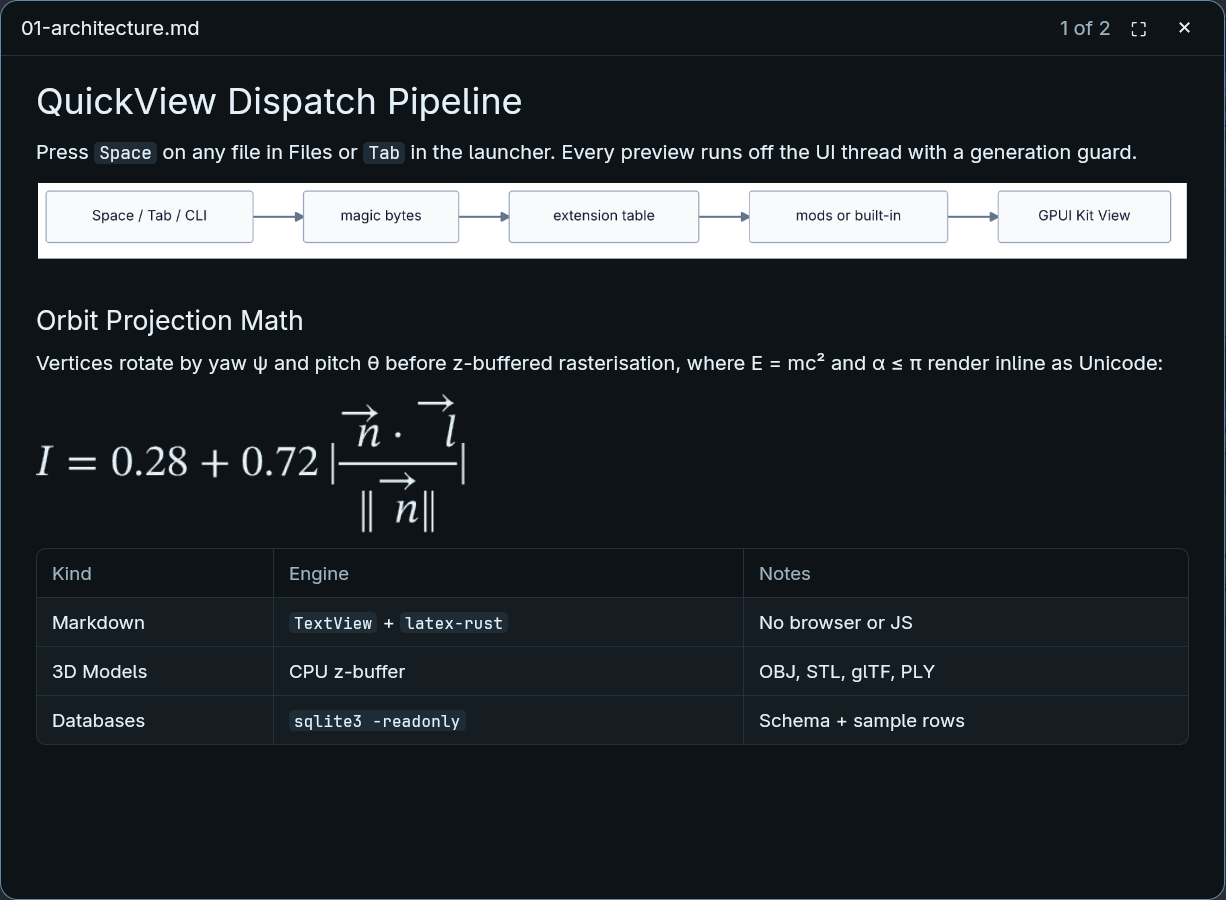
- Mermaid diagrams: Any
```mermaidfence gets handed to mermaid-rs-renderer (0.3.1), which lays out flowcharts and sequence diagrams directly in Rust and returns an SVG string. QuickView passes that SVG toresvgat1.5xnative scale (capped at2400px) and saves a PNG under~/.cache/cloudwerx/quickview/diagrams/keyed by a 64-bit hash of the diagram source. - Display math (
$$ ... $$): Both single-line$$...$$and multi-line fenced$$blocks are handed to latex-rust (3.0.3), which typesets the AST with the bundled STIX Two Math font at18ptonto a transparent PNG. Better yet,diagrams::theme_ink()reads thetextcolor from the active CLOUDWERX theme palette and hashes that RGB tuple into the cache filename, so switching from a dark theme to a light theme never serves stale invisible-ink equations. - Inline math (
$...$): Rather than dropping inline equations or spawning tiny misaligned PNGs mid-sentence,inline_math::convert_lineconverts common inline LaTeX into Unicode glyphs directly in prose: Greek letters, superscripts, subscripts,\sqrt{x}to√x,\frac{a}{b}to(a)⁄(b), and common operators.
The parser in diagrams::transform also tracks open code fences (``` and ~~~) line by line, and inline_math::convert_line tracks backtick code spans plus whitespace around $. That sounds trivial until you preview a Markdown file that talks *about* Markdown syntax. "costs $5 and $6 total", "price is $ 5 $", and "use \$x^2$` in code"all stay completely untouched, and if a Mermaid block has broken syntax or an equation uses an unknown command like\weirdcommand{x}`, QuickView leaves the raw text as the author wrote it instead of showing a broken image icon.
The first time you open a Markdown file with diagrams on a cold cache, resvg loads system fonts if the SVG contains <text> elements, which takes a couple seconds; every open after that hits the PNG cache and appears immediately.
The 328-line CPU 3D software renderer
Supporting .obj, .stl, .glb/.gltf, and .ply without spinning up a wgpu shader pipeline inside GPUI's own compositor took 328 lines of Rust across src/model/mod.rs and src/model/raster.rs, plus 157 lines for the interactive ModelView orbit widget.
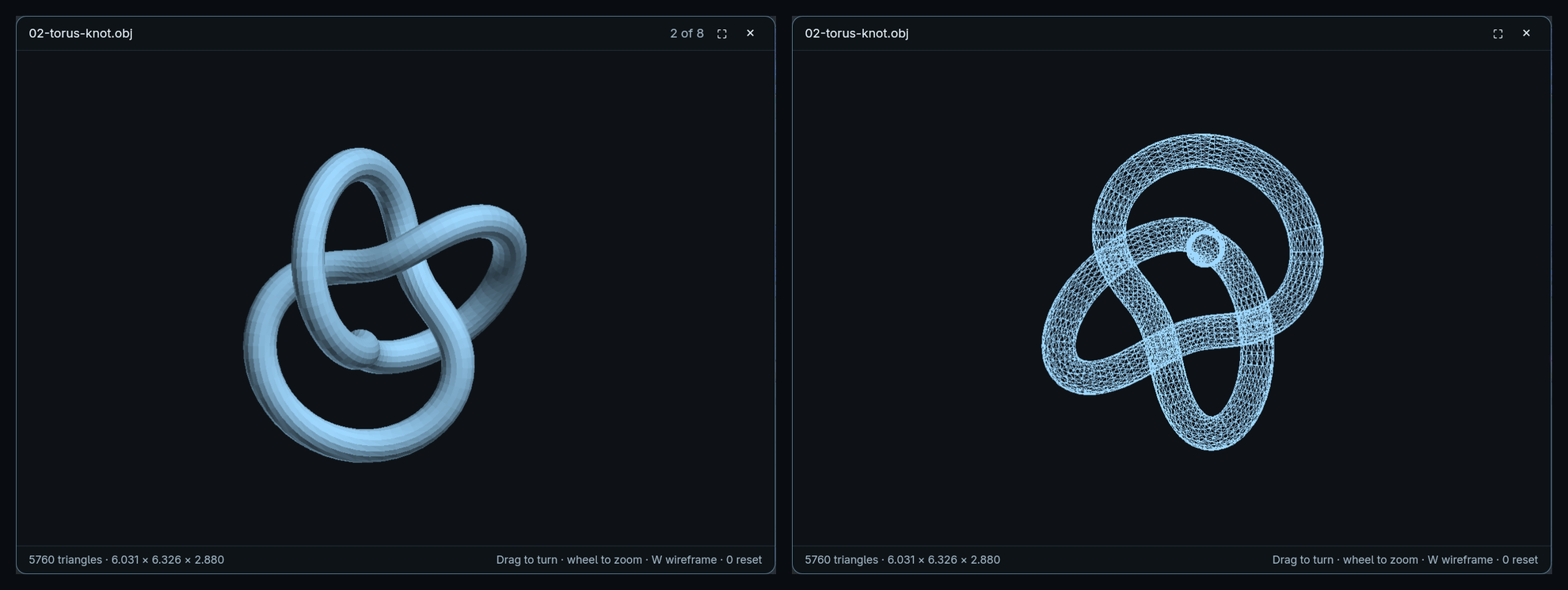
Why a CPU rasterizer? Because GPUI already gives us RenderImage, and a tight software loop has zero pipeline compilation, works identically on every GPU driver, and lets me swap solid flat shading for wireframe (W) with one boolean.
Each loader turns its format into a plain triangle soup Vec<[[f32; 3]; 3]>:
- STL:
stl_ioreads ASCII and binary STL faces. - OBJ:
tobjloads meshes withtriangulate: trueandsingle_index: true, automatically splitting quads and n-gons. - glTF / GLB:
gltfwalks the scene graph recursively, multiplying column-major $4 \times 4$ node transforms down to world space so multi-part assemblies land in the right places. - PLY: Hand-written in 82 lines (
ply()) supporting both ASCII andbinary_little_endianheaders, arbitrary vertex property layouts, and fan triangulation of polygon faces (rejectingbinary_big_endiancleanly instead of misreading bytes).
Once loaded, raster::render computes the axis-aligned bounding box, centers the mesh at the origin, fits its bounding radius $r$ to $92%$ of the shorter viewport half-axis scaled by view.zoom, and rotates every vertex around Y ($\psi$, yaw) and X ($\theta$, pitch).
For lighting, we take the cross product $\vec{n} = (\vec{r}_1 - \vec{r}_0) \times (\vec{r}_2 - \vec{r}_0)$ of the rotated triangle edges and light both faces against a fixed directional vector $\vec{l} = (0.35, 0.55, 0.76)$ normalized:
$$ I = 0.28 + 0.72 \left| \frac{\hat{n} \cdot \hat{l}}{|\hat{n}|} \right| $$
Using the absolute value is a tiny trick that pays off massively on CAD parts and open surface meshes: triangles with flipped or inconsistent winding still shade properly instead of turning pitch black. Then we compute the 2D screen-space bounding box of each triangle, evaluate signed barycentric edge weights $(w_0, w_1, w_2)$ at pixel centers $(x + 0.5, y + 0.5)$, and test depth against a Vec<f32> z-buffer (depth[i]). Inside raster.rs, notice the coordinate convention: z = -(w0 * p[0][2] + w1 * p[1][2] + w2 * p[2][2]) so larger positive z after rotation sits closer to the camera and wins z < depth[i].
In wireframe mode (W), line() steps along the dominant axis from $s = 0$ to $\lceil \max(|\Delta x|, |\Delta y|) \rceil$ and draws edges in the theme's primary accent color using a small depth bias (z <= depth[i] + 1e-3) so hidden edges behind front faces stay occluded without z-fighting on coplanar triangles.
To keep dragging silky even on dense meshes, ModelView uses a two-stage quality trick (redraw_moving):
fn redraw_moving(&mut self, window: &mut Window, cx: &mut Context<Self>) {
    self.redraw_at(0.4, window, cx);
    let generation = self.generation;
    cx.spawn_in(window, async move |this, cx| {
        cx.background_executor().timer(std::time::Duration::from_millis(220)).await;
        let _ = this.update_in(cx, |this, window, cx| {
            if this.generation == generation && this.drag.is_none() {
                this.redraw(window, cx);
            }
        });
    })
    .detach();
}
While your mouse is moving (on_mouse_move), it renders at 0.4x scale ($16%$ of the pixels) on a background thread and lets GPUI scale it up. The moment you release the mouse button (or 220 ms after your last scroll tick, guarded by generation), it renders one crisp 1.0x frame.
I ran the repo's dense-mesh benchmark (tests/model3d.rs, a 51,200-triangle sphere rasterized at 720x520) on this laptop to get real numbers:
| Build profile | Resolution | Triangles | Frame time |
|---|---|---|---|
Debug (cargo test) |
720 x 520 | 51,200 | 95.56 ms |
Release (--release) |
720 x 520 | 51,200 | 12.79 ms |
In release mode, 51,200 triangles at dragging resolution rasterize in 12.79 ms on the CPU, roughly 78 frames per second with no GPU compute shader needed.
Every other file type, and staying safe with untrusted files
Most files you hit Space on aren't 3D models. They're a PDF invoice, a messy CSV export, a config file, a SQLite state file, an archive someone sent you, or an .mp4 clip. Here's how the remaining families work, and what I refused to let them do.
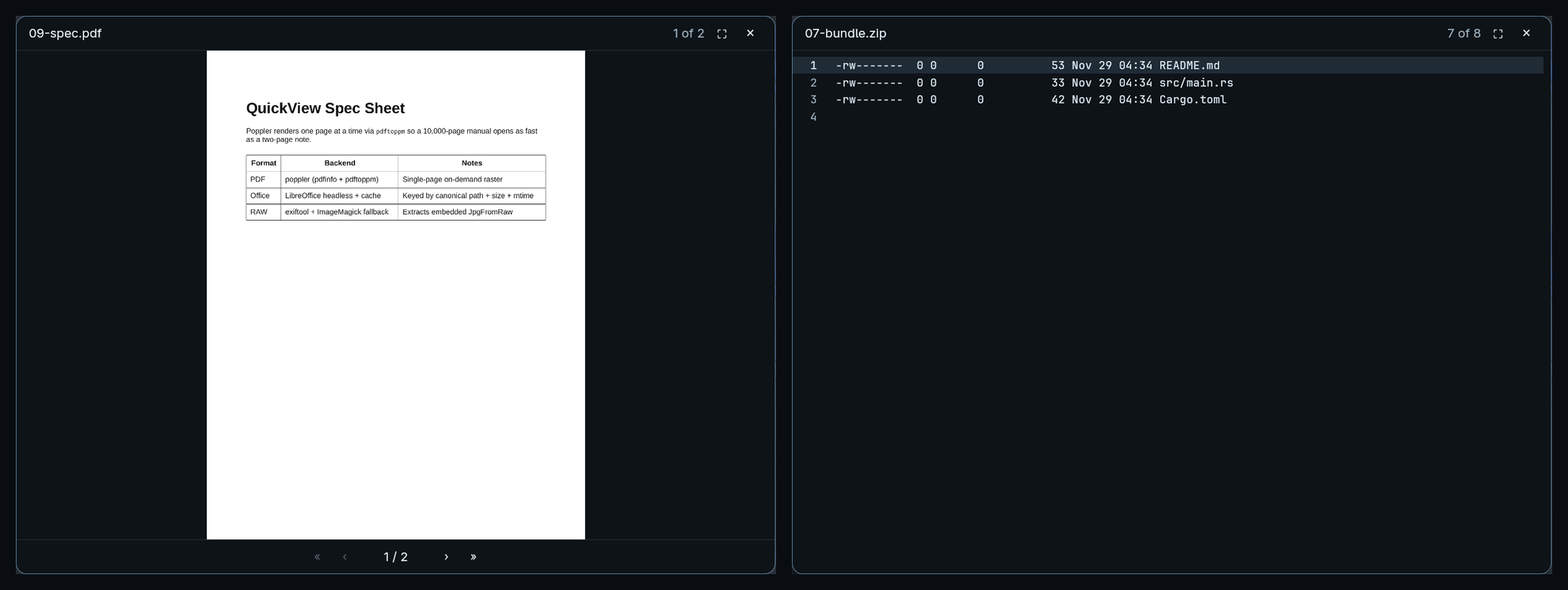
| Family | Backend | Safety and performance choices |
|---|---|---|
| Text & Code | GPUI EditorState + tree-sitter |
Reads only max_text_mb (default 4 MB) from disk so multi-GB logs open instantly without truncating mid-UTF-8 char |
| Pictures & RAW | image crate + resvg + exiftool |
Applies EXIF rotation; rasterizes SVGs to at least 1024 px; extracts embedded JpgFromRaw from CR2/NEF/ARW/DNG with magick fallback |
| PDF & Office | Poppler (pdfinfo / pdftoppm) + LibreOffice |
Renders one page at a time at pdf_dpi (default 200); refuses encrypted PDFs cleanly; caches Office conversions in an isolated soffice profile |
| Audio & Video | mpv (--vo=null) + ffmpeg |
Drives mpv over a per-PID JSON IPC socket; Drop sends quit and reaps the PID after 300 ms so media never keeps playing in the background |
| CSV / TSV / PSV | csv crate + virtualized table |
Caps at max_table_rows (default 5,000) so huge exports don't freeze |
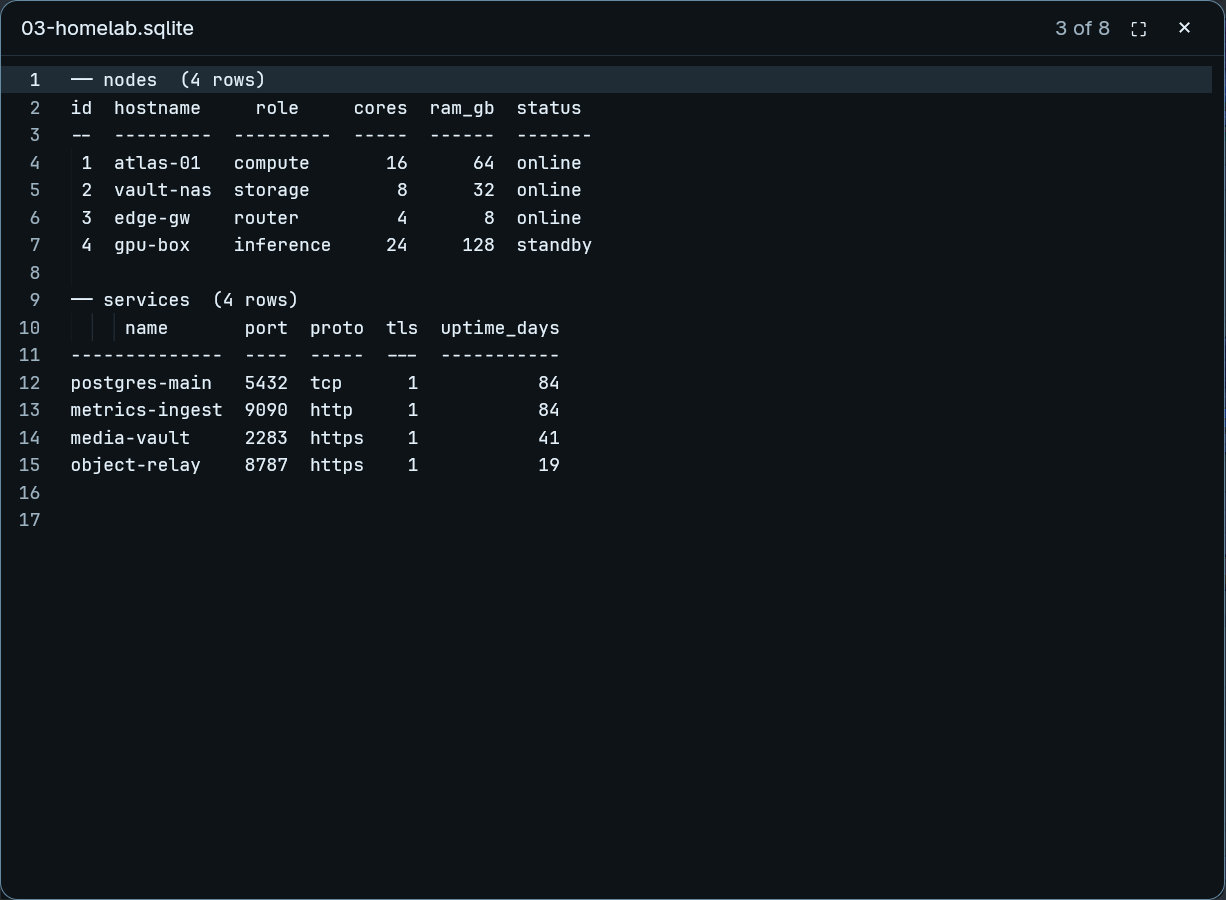
| SQLite | sqlite3 -readonly -header -column |
Opens strictly read-only, walks sqlite_master, counts rows and prints the first 20 rows per table |
| Fonts | ImageMagick magick + fc-scan |
Renders five specimen lines (56pt down to 16pt) using the font itself |
| Archives | bsdtar -tvf |
Lists up to 5,000 entries and never unpacks a single byte to disk |
| Web links | .url / .webloc parser |
Displays target URL; O triggers xdg-open only if link::openable confirms http:// or https:// |
A few small details in that table saved me real headaches:
- Isolated LibreOffice profiles: Running headless
soffice --convert-to pdfnormally fights with an already-open LibreOffice Writer window over its lockfile and silently exits with status 0 without converting anything.office::to_pdfcreates a freshtempfile::tempdir_in(cache)and passes-env:UserInstallation=file://.../profileper conversion, then caches the finished PDF by hashing(canonical_path, byte_len, mtime_nanos). - Never trust shortcuts or archives: Downloading a
.desktopor.urlshortcut shouldn't executefile://or shell commands when you glance at it, and previewing a sketchy.zipshouldn't extract anything into/tmp.link::openablestrictly rejects non-HTTP(S) schemes, andarchive::listonly pipesbsdtar -tvfstdout. - No leaked
mpvaudio: If you hitEschalfway through a video,Player::dropsends{"command":["quit"]}over the IPC socket, pollstry_wait()for 300 ms, then callschild.kill(), waits, and unlinks the socket.
Zero-rebuild Mods: extend QuickView with any script
I didn't want adding a niche format (Gerber PCB layers, MIDI tracks, parquet stats, custom binary headers) to mean cloning the repo and waiting through a Rust rebuild.
So src/mods.rs checks ~/.config/cloudwerx/quickview/mods/<name>/mod.json before any built-in extension handler runs. That means a mod can invent a brand new extension or override an existing one.
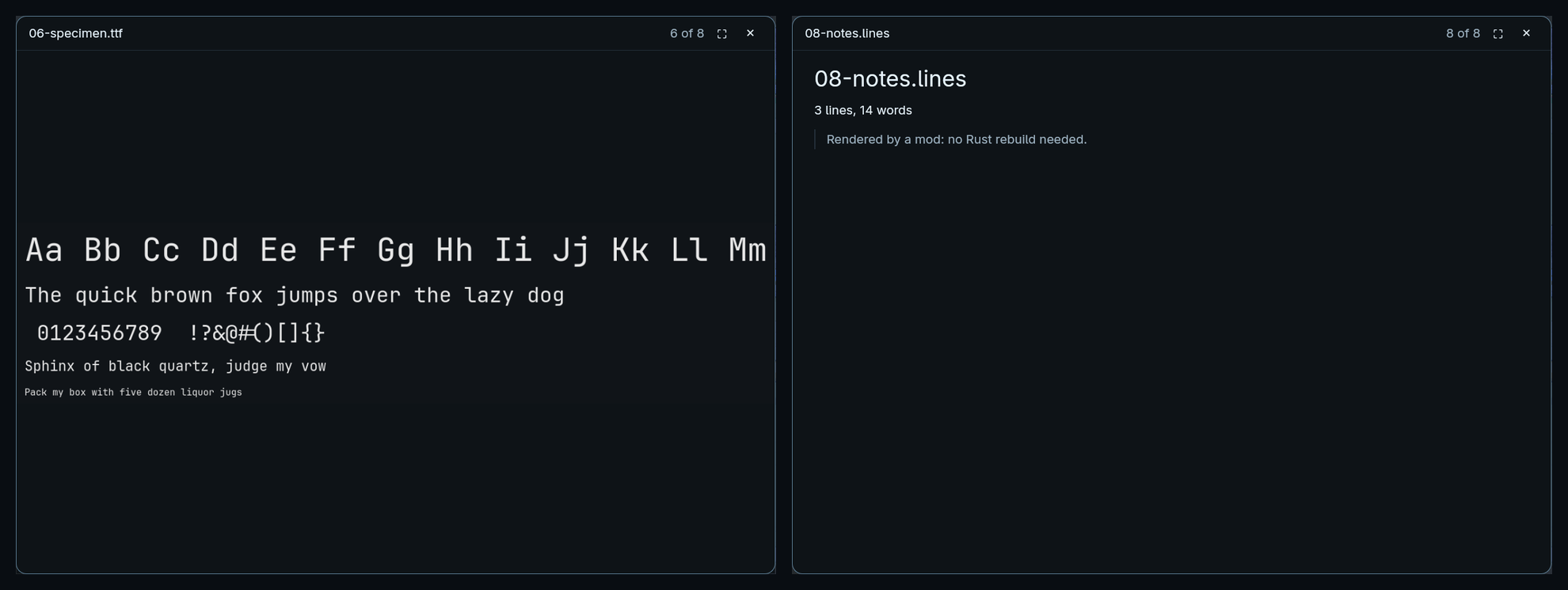
Here's the sample mod shipped in apps/quickview/mods/sample-lines:
{ "name": "Line counter (sample)", "extensions": ["lines"], "run": ["node", "main.js", "{file}"], "output": "markdown" }
And its main.js:
const fs = require("fs");
const text = fs.readFileSync(process.argv[2], "utf8");
const lines = text.split("\n").filter(Boolean);
const words = text.split(/\s+/).filter(Boolean).length;
console.log(`# ${require("path").basename(process.argv[2])}\n\n**${lines.length}** lines, **${words}** words\n\n> Rendered by a mod: no Rust rebuild needed.`);
Notice run is an argv array, not a shell string. QuickView spawns Command::new(program).args(rest) directly with zero shell interpolation, substituting {file} as a single argument, so a file named ; rm -rf ~ or containing spaces and quotes can't inject anything. Stdout is capped at 32 MiB, execution defaults to a 20-second timeout (configurable from 1 to 300 seconds via timeout_secs), and output can be "markdown" (which even flows through the Mermaid and math pipeline!), "text", or raw PNG/JPEG "image" bytes.
Live theming, keyboard shortcuts, and QML shell hooks
Because QuickView lives inside CLOUDWERX OS, it obeys the exact same theme contract as everything else on the desktop. src/theme.rs builds a gpui_kit::component::ThemeConfig from cloudwerx_core::kit_theme and runs a ThemeWatcher thread on ~/.local/state/cloudwerx/theme/theme.json. Whenever cloudwerx theme set <id> swaps the palette (see one-palette-every-app), QuickView updates its colors, borders, syntax highlighting, and 3D wireframe ink live without restarting.
Settings live in ~/.config/cloudwerx/quickview.json (editable from Settings › QuickView or quickview config), and Viewer::reload re-reads the JSON file on every file switch so changing pdf_dpi, max_table_rows, or autoplay applies on the very next arrow press.
Every key in Viewer (src/viewer.rs) routes through one unified KEY_CONTEXT so +, -, 0, and 1 zoom whichever view is currently active (pictures, PDF pages, or 3D models) without needing separate shortcuts per format:
| Keys | Action |
|---|---|
Space, Tab, Esc |
Close QuickView (keeps background process warm) |
Left / Right / Up / Down |
Step to previous or next file in the session |
PageUp / PageDown / Home / End |
Turn PDF or converted Office pages |
+ / - / 0 / 1 |
Zoom in, zoom out, fit/reset, actual size |
W |
Toggle 3D model wireframe |
F |
Toggle fullscreen (or fill output in --over mode) |
Enter / K / J / L / M |
Play/pause, seek back/forward 10s, mute |
O |
Open verified http(s) web shortcut in browser |
On the shell side, hooking QuickView into any Quickshell bar list takes one property on PanelList:
PanelList {
    quickViewPath: i => model[i]?.path ?? ""
}
From there, Space in Files, Tab in the launcher, Space in any bar panel list, and Super+Alt+Q for whatever file path is on your clipboard all drive the same warm viewer.
What is still missing
I'm keeping an honest list of gaps in apps/quickview/CHANGELOG.md rather than pretending v0.1.0 is finished:
[!info]- Known gaps in QuickView 0.1.0
- Interactive mod UIs: Mods convert files to Markdown, text, or images today;
gpui-shellis already inCargo.tomlfor future scripted interactive panels, which isn't wired up yet.- PDF text search: Poppler renders pages cleanly, but there is no
Ctrl+Fsearch inside PDFs yet.- Extra 3D formats:
fbx,dae,3ds,off, and3mfare mapped inKind::Model3dso they land on a clean message telling you only OBJ, STL, glTF, GLB, and PLY are implemented so far.- A maximize button and portal dialogs:
Ftoggles fullscreen, and GTK open/save file dialogs are owned byxdg-desktop-portal, so Space doesn't preview files inside file pickers yet.- Frame-exact A/V sync: Video and audio start together and resync on seeks and speed changes, which works well in practice, though I haven't measured frame-by-frame drift yet.
Even with those gaps, hitting Space on any file and having it appear in milliseconds, themed to match my terminal and bar, with zero Electron overhead, completely changed how fast I move around the filesystem.
If you run CLOUDWERX OS, try pressing Space in Files, Tab on a file in the launcher, or quickview on a folder of mixed stuff from your terminal and tell me which format breaks first.
Ty CLOUDWERX LAB, Digital Food for the Analog Soul cloudwerxlab.com · github.com/CLOUDWERX-DEV
Sources
- GPUI, the GPU-accelerated Rust UI framework from Zed
- wlr-layer-shell-unstable-v1 protocol, used for
--overoverlay surfaces above the launcher - YaLTeR/niri, the scrolling-tiling Wayland compositor
- linuxmint/nemo-extensions, home of
nemo-previewand theorg.nemo.PreviewD-Bus protocol - GNOME/sushi, the original GNOME Quick Look previewer
- 1jehuang/mermaid-rs-renderer, native Rust Mermaid diagram layout and SVG renderer
- jscarr64/latex-rust, pure-Rust LaTeX math typesetting with PNG output
- QuickView source tree (
apps/quickview/incloudwerx-os) andapps/quickview/CHANGELOG.md, which every code reference and thetests/model3d.rsbenchmark numbers above come from